September 29 College Council Information Meeting

Dear Faculty & Staff, This is a friendly reminder that a College Council Information Meeting will take place on Tuesday, September 29 at 9am via Zoomhttps://umanitoba.zoom.us/j/62397413368?pwd=4bvIS9vX385QmBRLtXIUHhlZdh4xhg.1. Please see the agenda package attached. To help maintain the confidentiality and integrity of our discussions, the Zoom Waiting Room feature will be activated for this meeting. This measure has been implemented to prevent AI meeting assistants, bots, and other automated tools from joining College Council meetings. We recognize that being admitted from the waiting room may create a slight delay, and we appreciate your patience and understanding. To help ensure a smooth start, the Zoom meeting room will open 30 minutes before the meeting begins, and attendees are encouraged to join early whenever possible. Please note that AI bots, meeting assistants, note-taking agents, and similar automated tools are not permitted to attend College Council meetings on behalf of participants. If you use any AI meeting tools, we ask that you review your settings before the meeting to ensure these applications do not automatically join or attempt to join the session.
AI Meeting Bots AI meeting bots, including Fireflies.ai, Otter.ai and Read.ai, should not be used in College of Nursing meetings.
These applications may be connected to your calendar and configured to automatically join meetings, sometimes without the meeting organizer being aware that they have been enabled.
Fireflies.ai
If Fireflies.ai is automatically joining your meetings and you do not intend to use it, please follow the instructions below to delete your Fireflies account.
Delete Your Fireflies Account
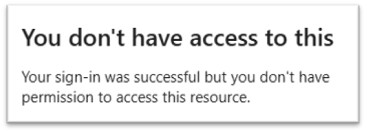
1. Log in to the Fireflies Settings page.https://app.fireflies.ai/login 2. Select Continue with Microsoft. * If you do not have a Fireflies account associated with your UM account, you should receive an error message:
[cid:b3bacf48-54e6-461e-b42c-f89b245b3d4e]
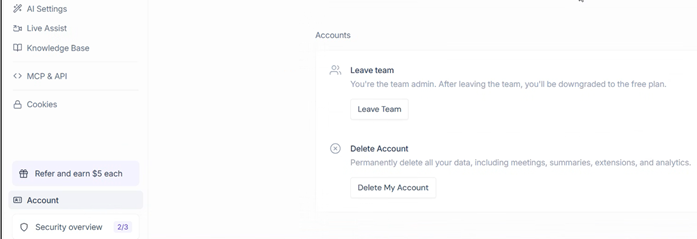
1. Once logged in, select the Settings ‘gear icon’ (bottom-left) 2. Select Account.
[cid:790b40f9-9fbd-4f70-822e-2879020e8bcf]
1. Scroll down to Delete Account. 2. Select Delete My Account. 3. Choose a reason for leaving and select Continue. 4. Select Delete Account to complete the process.
A video demonstrating how to delete a Fireflies account is also available here: YouTube videohttps://www.youtube.com/watch?v=cz7zLRTzM6w&t=43.
If you want to keep your Fireflies account
If you have purchased a Fireflies license or otherwise need to retain your account, please ensure that the application is not configured to automatically join meetings.
Change Auto-Join Settings
1. Log in to your Fireflieshttps://fireflies.ai/ dashboard. 2. Locate Current Meeting Settings (right-hand side of the dashboard). 3. Under Which meetings will Fireflies join?, select Only meetings I invite or Turn Off.
Selecting Turn Off will prevent Fireflies from automatically joining your meetings.
Thank you for your cooperation in helping us maintain a secure and productive meeting environment. We look forward to seeing you on September 29. Kind regards,
Dayo Akinola (she/her)
Executive Assistant to the Dean, Governance & Executive Coordination
College of Nursing, Rady Faculty of Health Sciences
University of Manitoba
Office 276 Helen Glass, 89 Curry Place
Winnipeg, MB, R3T 2N2
204-474-9920
[um_logo_email_signature]
nursing.deansoffice@umanitoba.camailto:nursing.deansoffice@umanitoba.ca
My office is located on original lands of Anishinaabeg, Ininewuk, Anisininewuk, Dakota Oyate and Denesuline, and on the National Homeland of the Red River Métis. I respect the Treaties that were made on these territories, I acknowledge the harms and mistakes of the past and present, and I dedicate myself to move forward in partnership with Indigenous communities in a spirit of Reconciliation and collaboration.

participants (1)
-
 Dayo Akinola